> ## Documentation Index
> Fetch the complete documentation index at: https://docs.ravenna.ai/llms.txt
> Use this file to discover all available pages before exploring further.
# What is Ravenna?
> Ravenna is a Slack-native, AI-powered service desk built for internal IT, HR, and operations teams to turn conversations into resolved requests.
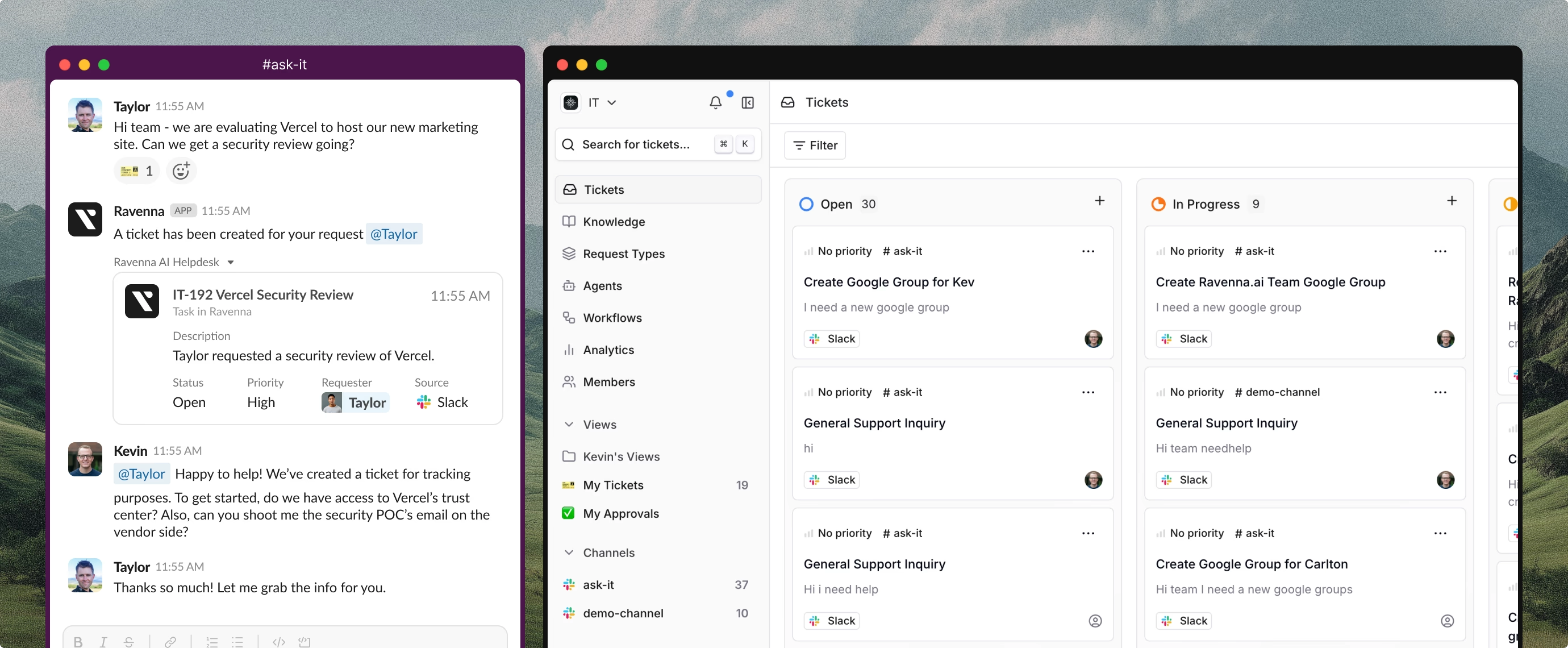 ## Internal support that works where your team works
Teams rely on Slack, Notion, Linear, and other modern tools to get work done. Traditional service desks force you to leave these tools, create tickets in separate portals, and lose context in the process. Ravenna brings service desk capabilities directly into Slack, where your team already communicates.
Most internal support starts informally in DMs, threads, or channel messages, not through formal ticket submission forms.
## Why Ravenna
Ravenna is built for internal support teams managing IT, HR, operations, and RevOps requests. It combines Slack-native workflows, AI automation, and traditional service desk capabilities without the friction of legacy systems.
Create and manage tickets directly in Slack without portals or context switching.
Agents answer common questions and route complex requests automatically.
Surface answers from Notion, Confluence, Slack history, and documentation.
Track metrics, identify trends, and improve processes with analytics.
## Core capabilities
Turn any Slack message into a ticket using shortcuts, emoji reactions, or slash commands. Work in public channels for transparency or use private flows for sensitive requests.
All context stays in the original thread where requesters and responders can collaborate naturally.
Deploy Agents that answer questions from your knowledge base, trigger workflows, and escalate to humans when needed. Configure Agent behavior with natural language rules and connect them to your tools.
Learn more about [AI Agents](/documentation/automate/agents/overview) and their capabilities.
Connect Notion, Confluence, Google Drive, Coda, Guru, Zendesk, Slack channels, and websites as knowledge sources. Ravenna indexes your documentation so Agents can provide accurate, up-to-date answers.
Control exactly what gets indexed to maintain accuracy and relevance.
Set up knowledge sources in [Knowledge](/documentation/automate/knowledge/overview).
Automate ticket routing, tagging, status updates, and escalations. Build workflows that integrate with external tools and trigger actions based on ticket properties or events.
Build automation with [Workflows](/documentation/automate/workflows/overview).
Organize tickets with channels, tags, categories, and custom views. Each team sees only relevant tickets filtered by workspace, channel, or assignment.
Support scales across departments without creating noise.
Track request volume, response times, resolution rates, and team performance. Identify patterns and bottlenecks to improve processes.
Explore metrics in [Analytics](/documentation/measure/analytics).
## How Ravenna works
Ravenna connects to your Slack workspace and integrates with your existing tools. Users create tickets directly in Slack, AI Agents respond when they can, and your team handles complex requests with full context.
Install Ravenna in your Slack workspace and configure channels for receiving requests.
Create channels to organize tickets by team, topic, or workflow.
Connect documentation sources, create custom forms for ticket submission, and set up categories to organize requests.
Automate ticket routing, tagging, and actions with workflows that trigger based on ticket properties or events.
Configure Agents with rules, knowledge sources, and workflows to automate responses.
Users create tickets from Slack messages, and Agents respond or route to your team.
Get started with our [setup guides](/guides/day-one/overview).
## Built for growing teams
Ravenna scales from small teams to enterprise organizations. Start with basic ticket management in Slack and expand into AI automation, custom workflows, and multi-workspace deployments as your needs grow.
Whether you support 50 employees or 5,000, Ravenna adapts to your processes without forcing you into rigid workflows.
## Internal support that works where your team works
Teams rely on Slack, Notion, Linear, and other modern tools to get work done. Traditional service desks force you to leave these tools, create tickets in separate portals, and lose context in the process. Ravenna brings service desk capabilities directly into Slack, where your team already communicates.
Most internal support starts informally in DMs, threads, or channel messages, not through formal ticket submission forms.
## Why Ravenna
Ravenna is built for internal support teams managing IT, HR, operations, and RevOps requests. It combines Slack-native workflows, AI automation, and traditional service desk capabilities without the friction of legacy systems.
Create and manage tickets directly in Slack without portals or context switching.
Agents answer common questions and route complex requests automatically.
Surface answers from Notion, Confluence, Slack history, and documentation.
Track metrics, identify trends, and improve processes with analytics.
## Core capabilities
Turn any Slack message into a ticket using shortcuts, emoji reactions, or slash commands. Work in public channels for transparency or use private flows for sensitive requests.
All context stays in the original thread where requesters and responders can collaborate naturally.
Deploy Agents that answer questions from your knowledge base, trigger workflows, and escalate to humans when needed. Configure Agent behavior with natural language rules and connect them to your tools.
Learn more about [AI Agents](/documentation/automate/agents/overview) and their capabilities.
Connect Notion, Confluence, Google Drive, Coda, Guru, Zendesk, Slack channels, and websites as knowledge sources. Ravenna indexes your documentation so Agents can provide accurate, up-to-date answers.
Control exactly what gets indexed to maintain accuracy and relevance.
Set up knowledge sources in [Knowledge](/documentation/automate/knowledge/overview).
Automate ticket routing, tagging, status updates, and escalations. Build workflows that integrate with external tools and trigger actions based on ticket properties or events.
Build automation with [Workflows](/documentation/automate/workflows/overview).
Organize tickets with channels, tags, categories, and custom views. Each team sees only relevant tickets filtered by workspace, channel, or assignment.
Support scales across departments without creating noise.
Track request volume, response times, resolution rates, and team performance. Identify patterns and bottlenecks to improve processes.
Explore metrics in [Analytics](/documentation/measure/analytics).
## How Ravenna works
Ravenna connects to your Slack workspace and integrates with your existing tools. Users create tickets directly in Slack, AI Agents respond when they can, and your team handles complex requests with full context.
Install Ravenna in your Slack workspace and configure channels for receiving requests.
Create channels to organize tickets by team, topic, or workflow.
Connect documentation sources, create custom forms for ticket submission, and set up categories to organize requests.
Automate ticket routing, tagging, and actions with workflows that trigger based on ticket properties or events.
Configure Agents with rules, knowledge sources, and workflows to automate responses.
Users create tickets from Slack messages, and Agents respond or route to your team.
Get started with our [setup guides](/guides/day-one/overview).
## Built for growing teams
Ravenna scales from small teams to enterprise organizations. Start with basic ticket management in Slack and expand into AI automation, custom workflows, and multi-workspace deployments as your needs grow.
Whether you support 50 employees or 5,000, Ravenna adapts to your processes without forcing you into rigid workflows.