Inbound email processing
Inbound email processing
Enable your queue to receive emails and automatically convert them into tickets. This allows external users to create tickets by sending emails to your queue’s dedicated address.Each queue gets a unique email address in the format:Guest users
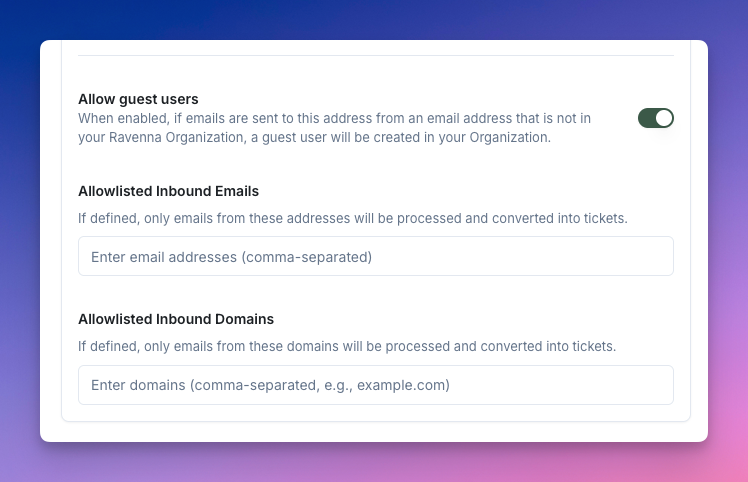
When enabled, emails from addresses not in your Ravenna organization will automatically create guest user accounts. This is useful for external support scenarios.Sender name
Customize the sender name for outbound emails from this queue. This appears in the “From” field when Ravenna sends email notifications.Bounce emails
When enabled, Ravenna sends bounce notifications for emails that fail to process, helping you identify delivery issues.
Email security and filtering
Email security and filtering
Control which emails are processed by your queue using allowlists. This helps prevent spam and ensures only authorized sources can create tickets.Allowlisted emails
Specify individual email addresses permitted to create tickets. Useful for restricting access to specific partners or vendors.Allowlisted domains
Specify entire domains permitted to create tickets (e.g.,
@yourcompany.com). This allows all users from trusted organizations to submit requests.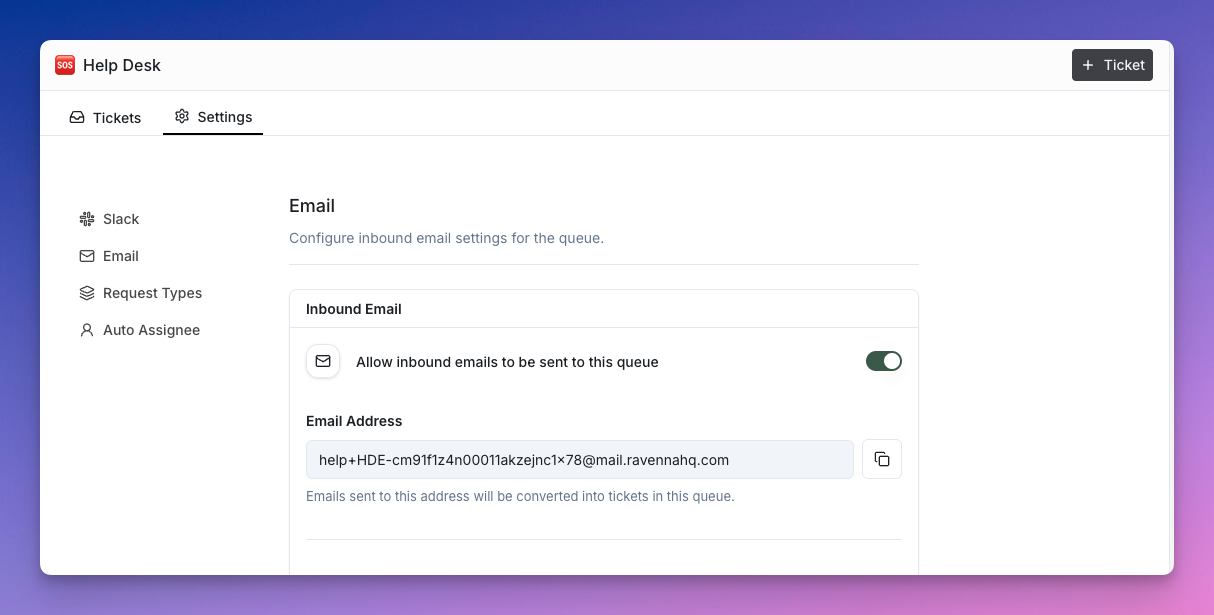
Email Allowlist Settings
By default, Ravenna only accepts emails from addresses that match your organization’s domain. But we know that’s not always enough - sometimes you need more control over who can email your queue.Guest Users
When you enable Guest Users, Ravenna becomes more welcoming to external email addresses. Think of it like having a bouncer at the door - you can let everyone in, or create a VIP list of specific email addresses and domains.