

WorkflowsMCPFoundrySlackTicketsAnalyticsKnowledgeConfluenceCopilotFormsSLAsOkta
Notion and Jamf Pro in Foundry
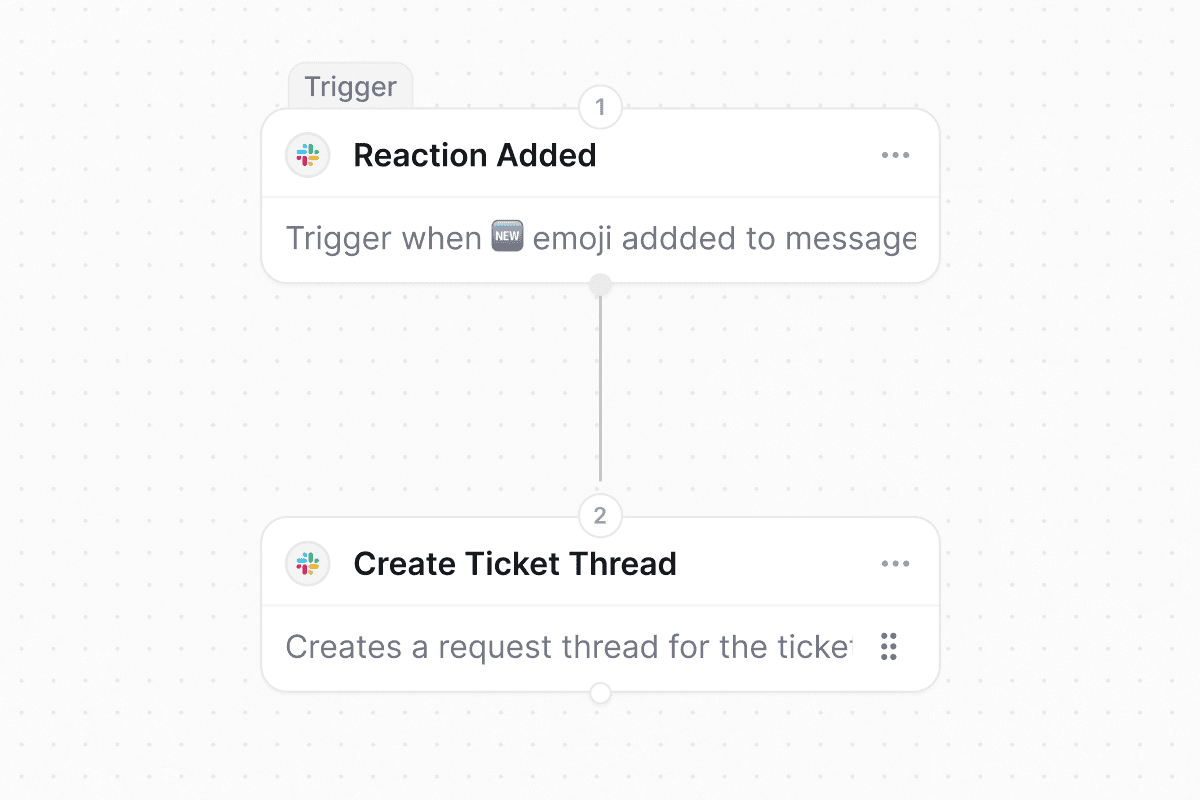
Attach existing Slack threads to tickets
Quality of life updates:
- Drag-to-reorder ticket detail sections between the tab bar and sidebar. Your layout saves to user preferences and follows you across workspaces.
- Analytics widgets can now pin their own date range instead of following the dashboard picker.
- Confluence knowledge sync uses the shared knowledge sources picker. Choose specific pages and blog posts (up to 3 levels deep) instead of pulling in the whole space.
- New Agent Outcome column on the tickets table, sortable and groupable. See views and filters.
- Copilot visual refresh: rounded side panel, consistent attachment cards, and a smoother thinking indicator.
- Foundry studio now shows clickable suggestion chips above the input when the model offers follow-up choices.
- SLA analytics and filters now account for business hours, pauses, and superseded targets.
- A new Complete Tasks workflow action marks task list items as complete on the trigger ticket.
- Workflow code actions can now return structured JSON data. Downstream steps reference individual fields via the variable picker.
- The MCP ticket tools now accept a
filesparameter for attaching files directly from tool calls. - A new MCP tool lets AI assistants open access requests programmatically.
- The Send Email workflow action now supports file attachments.
- Submitting a request form no longer fires duplicate events, so form-triggered workflows run once per submit.
- Private form custom fields can now be toggled required directly on the form without the workspace-level floor applying.
- The Assignee is Me ticket filter now works on the main tickets table.
- Slack emoji self-assignment (👀) and Public Emoji Actions now respect the workspace Assignee Options scope.
- Okta external-group syncs on tenants with many groups no longer hit rate limits.
- SLA drill-downs work again, and the ticket filter is now labeled SLA Outcome (Met / Breached).
AgentsApprovalsKnowledgeRavenna AICopilotMCPWorkflowsSlackTicketsFormsOrganizationsGoogle Drive
Knowledge Gaps
Gate agent tools with per-rule execution policies
Each tool referenced in an agent rule now has an execution policy that decides what happens before the agent invokes it: Auto-execute for read-only lookups, Requires confirmation to prompt the requester before a change, or Requires approval to open an approval round. Policies are scoped per rule, so the same tool can run automatically in a low-risk rule and require sign-off in a sensitive one. Write and delete tools default to confirmation, and read tools default to auto-execute.When you pick Requires approval, choose workspace admins or any approval template, including named users, groups, and role-based approvers like the requester’s manager. If a single agent run plans multiple approval-gated calls, Ravenna groups them by approver set and opens one parallel round per group, so approvers see one consolidated request instead of a stream of prompts.Scheduled Slack ticket reports built by Copilot
Ask Copilot for a recurring Slack report of live ticket data, for example your open tickets each morning or a team’s backlog every Monday, and it builds the workflow end to end. Copilot creates a cron-based schedule trigger, queries the tickets you describe, formats the results, and posts them to a Slack DM or channel. You preview the formatted message and iterate on it before turning the workflow on.Quality of life updates:
- The built-in tool group in the agent configuration tools picker is now labeled Ravenna, matching how the docs and rules already refer to these built-in tools.
- Custom form fields can now be marked Hidden, which removes them from every requester-facing form surface (web request form, portal, Slack and Teams dialogs, bulk editor, AI agent) while keeping them editable by agents on the ticket, prefillable by workflows, and available via the API. Required and Hidden are mutually exclusive.
- Text Area custom fields now support opt-in rich text. Admins flip a Rich text toggle on the field and requesters get a formatting toolbar on the web and Slack’s native rich text input, with values stored as markdown.
- Copilot and the MCP server ticket tools (create ticket, update ticket, add ticket message, update ticket message) now accept a
filesparameter so tool calls can attach files (up to 5 per call) directly from a URL or base64 payload. Each attachment is validated, MIME-checked, size-capped, and mirrored to Slack like any other ticket attachment. - The Slack Create Ticket Thread workflow action can now attach an existing Slack thread to a ticket by URL, post an optional custom message, and toggle the ticket card. Comments sync bidirectionally from the moment of attach.
- Workspace admins can now fast-forward timer-based Wait steps on in-flight workflow runs from the run detail panel, immediately advancing past the sleep without cancelling and re-running the whole workflow.
- Admins can now block and unblock individual organization members from the org members table. Blocked users are signed out on their next request and shown an account-suspended screen, without removing them from the org or losing history.
- A new Edit Completed Approvals workspace setting lets admins edit or reset an approval process after it has been decided. The timeline now shows the correct outcome for prior decisions even after a reset.
- When an access request needs manual provisioning, the ticket assignee now gets a Slack DM in the ticket’s mirror thread with a Provision access button that provisions the entitlement inline.
- The workflow builder’s app and action selection sidebar supports full keyboard navigation. Use the arrow keys to move through search results and press Enter to select, no mouse required.
- Copilot messages render through a new streaming-aware markdown pipeline, eliminating the visual flash between the streaming and finished states. Full-page Copilot also gets larger, easier-to-read text.
- Google Drive knowledge sync now detects when its access token has been revoked and prompts you to reconnect the integration, instead of failing silently and leaving documents out of date.
- A running workflow no longer receives duplicate trigger signals after it has already started. Trigger signals are now scoped to starting new runs only, so the same ticket event is not processed repeatedly.
GitHubPortalTicketsWorkflowsSlackFoundryCopilotAgentsAnalyticsMCPKnowledgeWorkspaces
Native Ravenna Github App
Curate Portal suggestions per workspace
Suggested questions in the Portal can now be tailored per workspace. Each workspace maintains its own list of suggestions, adds back any organization-level questions it has dropped, creates new suggestions inline, or hides suggestions entirely with a single toggle so requests reach the right place. Workspaces start from the organization list until an admin customizes it, and only portal managers see the controls.Custom ticket attributes in Slack and workflows
Custom ticket attributes now appear on the Slack work object card and are fully supported in workflows. Workflow actions can create or update tickets with attribute values, workflow conditions can match on attributes, and Copilot suggests and validates attributes when building workflow steps. The workflow step input panel lists attributes alongside built-in ticket fields.Quality of life updates:
- The queue Ticket Sync settings now use a single toggle to turn the integration on or off, and the disconnect control lives with it in the card header.
- The tickets table SLA column is cleaner. It shows the most urgent pending target while a ticket is active, then a compact
SLA: met/totalsummary once every target is resolved. - Foundry’s Available APIs panel now lists every Foundry-enabled integration, including native integrations like Slack workspaces and connected APIs like Meraki. Clicking a native integration creates a new function with the integration already connected. See Foundry integrations.
- Copilot suggests up to three quick replies, ordered best-first, so the strongest suggestion is always visible.
- Saving an agent rule without a title now shows an inline Required error and focuses the title field. Long agent names in the picker are no longer cropped.
- The analytics percentage aggregation dropdown has an explicit None (share of total) option, and the Agent Outcome filter can target tickets with no outcome yet with is empty and is not empty.
- MCP OAuth now supports the
offline_accessscope, so MCP clients stay signed in across sessions without re-authenticating. - The default inactivity window for the workspace auto-close policy is now 30 days, so new workspaces get a longer default before a stale ticket is warned and closed. Existing workspaces keep whatever window they already set.
- Agent rules no longer flag knowledge resources in nested folders as invalid. Rules that point at documents inside subfolders stay green.
- The Portal home loads more smoothly. Hero, chat input, team list, and workspace cards now reveal together, and organizations that enable Show organization logo instead of profile picture without uploading a logo get a clean default fallback.
- Date-range filter calendars on ticket lists and analytics widgets highlight the day you clicked, including in timezones near the international date line.
WorkflowsFormsTicketsRavenna AIAnalyticsPortalEmailFoundrySlackOktaGoogle WorkspaceMicrosoft Entra
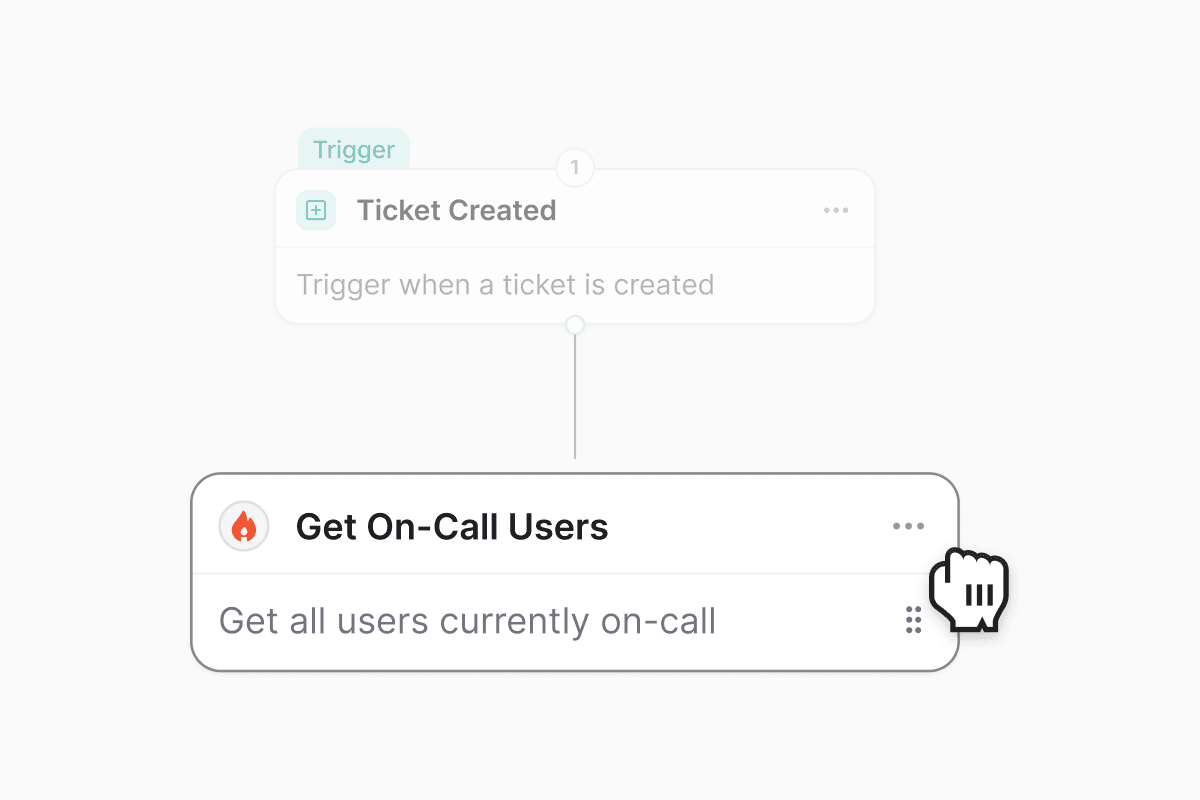
Rearrange steps in the workflow builder
Share forms publicly, no login required
Turn on Public access for a form to host it at an unguessable URL that anyone can submit without signing in, so you can collect requests from vendors, event attendees, or anyone outside your organization. Public forms accept simple input fields only and never expose workspace data, and each submission is rate limited and protected by a CAPTCHA. Copy the public link from the Share popover, and rotate the link whenever you need to invalidate the old one.Use Slack, Google Workspace, and Okta credentials in Foundry actions
Quality of life updates:
- Ticket details now leads with a date chip and a requester chip in the metadata row, and drops the redundant assignee chip since assignee already lives in the sidebar. Long ticket subjects no longer leave a big gap above the first message, and message reaction tooltips render in the right place instead of jumping to the top of the page.
- The Share popover on analytics dashboards has been refreshed with a cleaner layout, clearer sharing options, and tighter defaults so it matches the rest of the settings surfaces.
- The ticket sidebar shows fewer, quieter SLA badges. Non-actionable states are hidden, the SLA section only expands when there’s something to show, and the sidebar renders faster on tickets with many attributes.
- Ravenna AI messages have a refreshed card and bubble treatment across the
/aichat, the side panel, and agent chat. User messages get a tighter bubble, and attachment cards (workflows, tickets, filters, widgets) share a consistent shell. - Organization admins can now retry a failed custom email domain verification directly from settings. If AWS can’t find the DNS records inside the 72-hour window, a Retry Verification button restarts the check without deleting and re-adding the domain.
- Ravenna AI’s message classifier now understands image and file attachments. A screenshot or document dropped into a thread, even with no accompanying text, is treated as a reply to the agent when the agent recently asked for one, so evidence-only responses no longer get skipped.
- Slack tickets that Ravenna auto-creates from a new thread now include the triggering message before they publish. Ticket previews, notifications, and Ravenna AI’s first read all see the actual request instead of an empty body.
- The tickets table no longer breaks its layout when custom-field columns are added. Rows keep their alignment as columns are toggled.
- Guests can no longer perform ticket mutations they shouldn’t. Guest workspace members are now treated the same as non-members for ticket edits, matching how roles and access already describe guest behavior.
- Non-member requesters can attach files to a form’s file custom field on the Portal and on public hosted forms, and rapid double-clicks on submit no longer create duplicate tickets.
- Agent chat logs no longer leak conversations across agents. When you open an agent’s chat history, you only see conversations that belong to that agent.
- Microsoft Entra group sync now links groups back to the enterprise applications they’re assigned to, so Entra-backed access levels resolve correctly for group-based provisioning.
- SSO sign-ins no longer trip the email verification step. Users completing SSO log in on the first try instead of being sent through an extra verification round trip.
SLAsTicketsCopilotAgentsFoundrySlackAccess requests
SLA policies now switch when ticket attributes change
Plan multi-step automations with Copilot
Copilot has a newplan_automation tool that recommends the right shape for a multi-resource ask before it builds anything. Describe the goal, and Copilot reads your workspace inventory (queues, forms, custom fields, agents, agent rules, connected agent tools, Foundry integrations, and workflow actions), picks between a native workflow, an agent with rules, or a Foundry-backed integration, and returns a concrete plan you approve before any create step runs. Asks that aren’t automations (like analytics questions) are politely declined with a pointer to the right surface.Quality of life updates:
- Agent rules can now set tags and statuses. Rule instructions that reference
[tag: ...]or[status: ...]in agent rules apply those values automatically after publishing, using the same bracket mention pattern that already worked for categories and workflows. If a rule sets a status, it runs after publishing so it isn’t overridden by the queue’s default open status. - New users provisioned in Okta now flow into Ravenna automatically. When Okta workflows create a user, the sync creates the matching Ravenna user in place instead of waiting for the person’s first sign-in.
- Foundry actions bound to Slack can be retargeted to a different workspace again. The linked native bridge row in the configure panel gets a switch icon (admin only) that lists your org’s other Slack workspaces and repoints the action in one click.
- Foundry
ctx.fetchonce again reaches unauthenticated public APIs (like a weather endpoint) from a function whose primary integration is a native bridge. The bridge’s host allowlist now only constrains the bridge client’s own authed calls, not the generic escape hatch.
- Slack Connect messages now route to the workspace that actually owns the channel. Previously, a guest posting in a shared channel owned by another org could be silently dropped when the connected queue lived in a different Ravenna org; the channel-first lookup now resolves across orgs.
- Copilot no longer crashes the entire page when a single response attachment card fails to render. Each card sits behind its own error boundary and degrades to a muted “Couldn’t display this item.” fallback so sibling cards, follow-up chips, and the assistant’s answer keep working. This covers
/ai, the side panel, KB explain, and agent chat. - Guest workspace members can no longer open a ticket by direct link that they wouldn’t see in their filtered list. Ticket visibility, semantic search, and unread counts are now consistently scoped to participants for guests across every surface. Copilot ticket lookups also verify the ticket belongs to the caller’s workspace, closing a cross-workspace read/write hole.
- Workflow direct URLs are decoded correctly on workspaces using a custom domain, so tokenized links from workflow actions resolve on the first click instead of failing at the URL parser.
- Slack knowledge base answers with citations render as the original plain markdown source links again, replacing the card layout that was in flight.
TicketsWorkflowsAccess requestsPortalSlackRavenna AIAnalytics
Auto-close stale tickets after a warning
Workspaces with the inactivity policy on now get a recurring sweep that finds tickets which have gone quiet, decides whose turn it is to reply, posts a single warning that mentions the right person, and closes the ticket automatically if nobody responds within another inactivity window. Empty tickets, where the requester opened a ticket but never described the ask, are also picked up and nudged instead of being skipped. One knob (inactivityHours) governs both the warning and the close, so agents stop hunting through untouched tickets that nobody plans to answer.User settings work without a workspace
Profile, notifications, preferences, appearance, connected apps, and passkeys now live at slugless/settings/* URLs and load for any signed-in user, including org-portal members who don’t belong to a workspace. The org portal sidebar surfaces Profile and Notifications entries so those users can actually reach and save their settings, including their Slack vs. email notification preferences, instead of being bounced to the Portal chat. Existing workspace-scoped links redirect to the new paths automatically.Quality of life updates:
- The ticket details page is now responsive on mobile and tablet: keyboard hints and navigation labels hide on narrow screens, padding tightens, and message cards resize so tickets are usable from a phone. Conversation preferences (sort direction and Hide logs) now persist across tickets, and posting a comment auto-scrolls to the newest message when the thread is sorted oldest-first.
- The Access Entitlements and Access Levels settings filters default to multi-select (“is one of”), so you can filter by several applications, access levels, or statuses in one pass instead of stacking single-value filters.
- Ticket events now display the correct application for manually provisioned entitlements, so audit history matches what agents see in the app.
- A new Processing status is available on entitlement triggers, so workflows can fan out on in-flight SAR provisioning alongside the terminal outcomes.
- Comments on work objects and public forms are no longer gated behind feature flags. Both are on for every workspace.
- The Foundry action sidebar keeps you at the group root when you clear a search instead of snapping back to a previously-open group, and surfaces a warning when an action references a native integration that has been deleted.
- The Ravenna AI Copilot chat picks up analytics parity with the standalone dashboards, so questions asked from the
/aichat return the same shape of data you’d see building the equivalent widget by hand. - Refreshed icons and chrome across the
/aisurface make the chat panel, message actions, and tool chips easier to scan at a glance.
- The Wait and Wait Until workflow steps once again accept duration strings like
5d,-3h, and+1w. Recent form-generation changes had silently blocked letters and reduced the inputs to bare numbers. - The Agent Outcome filter on saved ticket views now returns tickets that actually match the selected value, and automatically pairs itself with a Done/Closed status filter so results aren’t hidden by the default view scope.
- Editing a ticket attribute (Status, Priority, Channel, and others) in the sidebar no longer flashes the old value before settling on the new one after the save.
- Public hosted forms with select, multi-select, or timezone fields no longer crash when opened by an anonymous submitter, and use consistent fonts across every field.
- Ravenna AI now attributes access requests and escalations to the actual person the requester named, not the message author, so a manager filing a request on behalf of a teammate provisions access for the teammate.
- Slack Workflow app forms once again populate the Application Select dropdown and its dependent fields (like Access Level), so forms opened from a Slack workflow finish end to end.
- Sidebar form titles wrap and truncate cleanly at two lines instead of overflowing their card, and the SLA sidebar layout and attachment overlay rendering are fixed.
- The Ravenna AI conversation and message classifier are pinned to the current generation of Google models after Google retired the previous flash tier, so agent responses and classification stop failing on retired-model errors.
TicketsFoundryAccess requestsOrganizations
Use Cloudflare credentials in Foundry actions
Auto-close tickets when an access request is provisioned
Tickets linked to an access request now move to a Closed status automatically when the request finishes provisioning. Ticket status stays in sync with what’s actually happening in the connected app, so agents don’t have to circle back and close the ticket by hand once access is granted.Filter directly from the Cmd-K command palette
The global search palette (Cmd/Ctrl+K) now has a filter row above ticket results. Status and priority quick-filter buttons are always visible, and a + Filter menu exposes the full field list with a guided operator → value flow. Active filters render as compact chips and carry through to the See all results page so you don’t lose the query on the way to the full table view.Quality of life updates:
- The Add sub-ticket modal now supports multi-select, so you can attach several tickets as sub-tickets in one pass instead of adding them one at a time. Selected tickets stay pinned even if they fall out of the current search, and
Cmd/Ctrl+Enterconfirms the batch. See ticket relations for how the hierarchy works. - Organization admins can now invite members directly from Organization Settings → Members, picking the target workspace in the invite modal. Previously, invites had to be sent from each individual workspace.
- The workflow editor now has a pencil icon next to the breadcrumb that opens the same rename dialog as the workflow list, so you can name a new workflow without leaving the editor. The button hides once the workflow is Active.
- Ticket metadata chips are now interactive: click the assignee or priority chip to change it inline, click the ticket ID to copy it, and jump straight to the source Slack thread from the source chip. Tickets with no priority no longer render an empty chip.
- The ticket action dock puts Private note ahead of Mark as done, and the Undo mark as done state uses a dedicated icon so the two actions are easier to tell apart at a glance.
- The Download all attachments action from yesterday’s release now also covers a ticket’s own attachments. When a ticket has more than one attachment, an Attachments (N) header appears above the tiles with a Download all button that packages them into a single zip. See ticket attachments.
- Chatlog filters for Message, Sender, and Agent now match in the database instead of scanning first-message content in application code, so chatlog queries return faster on large workspaces and skip the extra work entirely when no chatlog filter is set.
- Analytics dashboards go back to the multi-hue categorical chart palette, restoring distinct colors per series after a brief monochrome-blue experiment.
- Fixed a data-scoping issue on chat log routes where a user with a chat log ID from another organization could read that org’s events. Ticket event reads, updates, and deletes now enforce organization and workspace access on every request. No user action is required.
- Adding a hyperlink in the ticket-create rich text editor no longer submits the underlying Create ticket form. Confirming or pressing Enter in the link popover now only applies the link.
- Form composers with a Requester system field no longer show two Requester entries in the interpolation dropdown.
- Renaming a system field (for example, Description → Justification) on a form no longer trips the duplicate-label check when the same field is re-added, and drag-drop no longer appends a numeric suffix. The label edit modal now also notes that a rename only applies to the current form.
- Deleting an approval round now soft-deletes it, so the ticket event history around the approval stays intact. Notifications only fire when an in-progress round is deleted.
TicketsWorkflowsCopilotAnalyticsAgents
Automatically reopen resolved tickets when the requester replies
Ravenna now reopens a ticket in a Done or Closed status group when the requester sends a new message that reads as a genuine request. Reopens work across every channel, including email, Slack, Microsoft Teams, the Admin, and the Portal. Bot senders and internal agent comments never trigger a reopen. When a reopen fires, Ravenna posts a private system note on the ticket explaining why it moved back to Open.The setting is on by default. Workspace admins can toggle it from the new Re-Open Tickets card under Settings → Workspace → Automation.Lock shared table views and duplicate any view
Shared table views now have an Allow edits toggle that controls who can promote personal changes back to the shared view. When it’s off (the new default), non-owner, non-admin members no longer see the Save for all and Save view options to view actions, so their personal filter, column, sort, and display-mode tweaks stay scoped to them. Owners and workspace admins always bypass the lock. Every member can still customize the view for themselves through the existing personal overrides model.Any workspace member can also Duplicate a view from the sidebar’s view menu. Duplicates are always created private, locked (Allow edits off), and owned by you. Each copy captures your effective view, layering your personal filter and display overrides on top of the shared configuration instead of cloning only the owner’s saved definition.Inline previews and download all for ticket attachments
Ticket attachments now open in a redesigned preview with a header, filename, and one-click download. Inline previews cover PDFs, audio, and text files alongside images and video. Messages with more than one attachment get a Download all attachments action in the message menu that packages everything into a single zip.Quality of life updates:
- The entitlement status workflow trigger now accepts multiple statuses in one rule, so a single workflow can fan out on Provisioned, Deprovision failed, Skipped provisioning, and other outcomes together instead of duplicating the trigger.
- LLM calls that power Copilot, agents, and the message classifier now fall back to a secondary provider on retryable errors, so a transient outage or rate limit at one provider no longer surfaces as a failed run.
- The SLAs section on the ticket sidebar now starts collapsed when a ticket has no matching SLA targets, so the attribute panel stays focused on fields that apply.
- The workflow editor side panel no longer shows stale inputs after switching a step to a different action. The panel now re-renders cleanly when the selected action changes.
- Message editor: pressing Shift+Enter at the end of a code fence now creates the code block instead of leaving raw backticks. Picking a language that isn’t recognized falls back to plain text instead of throwing.
- Copilot analytics: grouped average, sum, min, max, and percent of queries no longer error out. Grouping by a time field (like created at or hour of day) now defaults to a daily bucket so the query runs without extra prompting.
FoundrySlackTicketsGoogle Workspace
Use Microsoft Entra credentials in Foundry actions
Quality of life updates:
/supportis now a Slack slash command alongside/ravand/help, giving teams that use “support” as their everyday word another discoverable entry point into ticket creation.- Foundry actions now let you configure a linked built-in integration inline from the Integrations panel, so admins can adjust scopes and native credential settings without leaving the action editor.
- Ticket lists now sort by more custom field types, including Duration, Timezone, and Boolean fields, so queues built on those columns stay in a consistent order.
- Google Workspace group sync now stores the group description alongside owners, managers, and settings, so descriptions stay in step with what’s set in the Google Admin console.
- Imported Slack bot users are once again selectable as assignees, authors, approvers, and requesters when a workspace has bot users enabled, restoring parity with mention search.
CopilotTicketsOktaPortalFoundryKnowledgeSlack
Inline-edit dates and custom fields in the tickets table
You can now edit date columns and custom field columns directly from the tickets table, without opening each ticket. Click a cell to update a due date, single- or multi-select tag, or text value in place and move on to the next row.Resolution path metric on ticket analytics
The Tickets dashboard now includes a Resolution path breakdown that classifies every resolved ticket as human touched, AI resolved, workflow only, or unclassified. Group any Tickets widget by Resolution path to see the mix over time, and use the new No Human Touch percent-of field to track the share of resolved volume that closed without an agent stepping in.Quality of life updates:
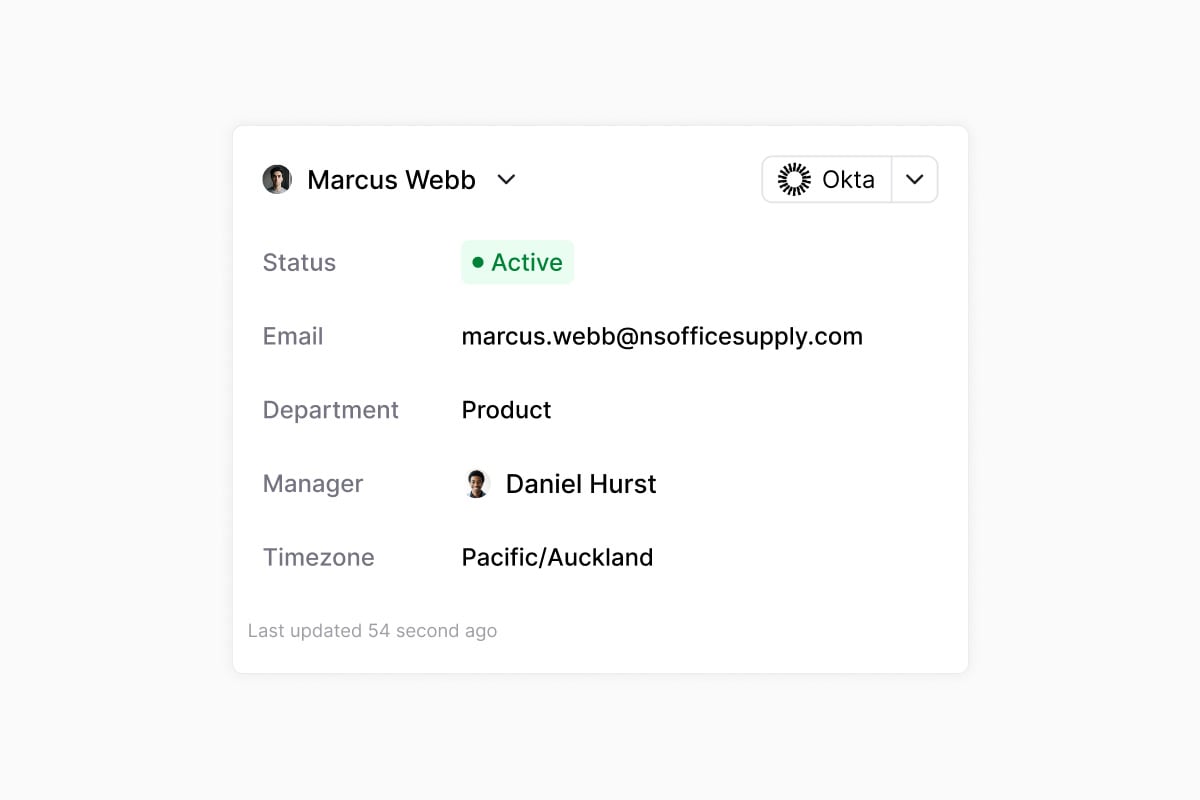
- The Okta requester card now shows the user’s Status and Last login, so you can spot deactivated or stale accounts at a glance.
- The Portal home now lists workspaces you belong to but haven’t opted into as a portal user, so members can jump straight into those teams instead of hitting a dead end.
- The agents editor tool list has a cleaner header with an inline Add button, a lighter tool row layout, and tidier @mention chips.
- The OAuth provider dialog groups fields under Basic, Authorization, and Token exchange headings, adds a grant type control that hides irrelevant fields, and cleans up the Advanced settings section.
- The Connect fields tab in the OAuth provider dialog is now hidden for org-scoped providers, since connect fields only apply to global provider templates.
- When Foundry action research hits an unhelpful cached page, it can now skip the cache, exclude URLs it has already tried, and fetch a direct URL you paste in, so iterating on doc discovery is faster.
- Foundry agent tools now route through the same approval and confirmation gates as other agent actions, so guardrails you configured on an integration apply everywhere.
- Foundry OAuth integrations using the Client Credentials grant type now refresh their tokens correctly instead of failing once the initial token expires.
- SharePoint knowledge base citations now open in the SharePoint browser viewer instead of forcing a file download.
- Knowledge base resyncs now patch source URLs on existing documents, so links stay current when a source changes how it exposes URLs (for example, SharePoint’s viewer URLs).
- Google Drive knowledge sources now resolve file IDs from the correct field, fixing metadata fetches for documents added after the recent knowledge source refactor.
- @mentions in Slack messages used with Rapid ticket creation now convert to plain names in the ticket description instead of leaving raw Slack IDs.
OktaFoundryAnalyticsSlackTicketsKnowledge
Configure your Okta requester card
Client Credentials OAuth providers in Foundry
Register a Foundry OAuth provider with the Client Credentials grant type for server-to-server APIs that authenticate the whole org with a single machine credential. A new Connect fields builder lets you collect per-org values (like a tenant ID or account slug) during connect and interpolate them into the token URL, so one provider template covers customers with different endpoints.Quality of life updates:
- You can now sort ticket lists by a single-select custom field, so queues built on tags like tier, environment, or region stay in a consistent order.
- SLA over-time analytics widgets now include tickets with no priority, so at-risk and breached counts match what you see in the ticket list.
- The Okta password reset and MFA reset agent tools are now separate actions, so agents pick the exact remediation instead of running both. See the Okta workflows reference.
- When an AI agent hits its tool-call limit, it now posts a short summary of what it got done instead of leaving the conversation in a “thinking” state, in Slack, on tickets, and in the Portal.
- Slack message edits now sync attachment additions and deletions to the linked ticket, keeping the ticket file list in step with the source message.
- Consecutive SLA events on a ticket are grouped in the activity timeline, so long-running tickets read more like a summary and less like a wall of events.
- The knowledge base document picker now reuses an existing Google Drive connection when one is already set up, so you skip the reconnect step when adding new folders.
- Knowledge sources whose documents are all archived are now hidden from the ingestion queue, so status views only surface sources with real work to do.
- The SharePoint integration tile now uses the SharePoint logo.
- The SLA tag filter now displays the tags you’ve selected instead of showing an empty chip.
- Synced groups from identity providers now appear on the Application → Groups tab again.
- Reminders on tickets now cancel correctly when the ticket status changes to a state that shouldn’t carry a reminder.
- The escalation banner in Slack no longer renders with a broken border.
- Time to Resolution and Time to Close widgets no longer show negative durations when a ticket is reopened and closed again.
- The knowledge source picker modal no longer clips its content on smaller screens and scrolls the full list.
- Notion knowledge sources refreshed right after a re-auth now wait for the index to catch up, so documents no longer briefly disappear.
- Reconnecting a Freshservice knowledge base no longer duplicates or orphans source records.
- Foundry OAuth providers now free their slug on delete, so you can recreate a provider with the same name. Connecting a Client Credentials provider from Settings → Integrations now works on the first click.
- The Foundry OAuth Connected badge now shows immediately after a successful connect instead of only after a page refresh.